Roborock Error 1 Fix: Troubleshooting the LDS Sensor
Roborock Error 1 indicates that your vacuum’s Laser Distance Sensor (LDS) is obstructed or unable to spin. This failure prevents the robot from mapping your home and brings cleaning sessions to a complete halt. Following these steps will help you clear the obstruction and restore your vacuum’s navigation system.
TL;DR
- Identify if the laser turret is spinning or stuck.
- Clean the laser lenses with a dry cotton swab.
- Manually rotate the turret to dislodge internal debris.
- Check the internal belt and motor if manual rotation fails.
What causes a Roborock Error 1
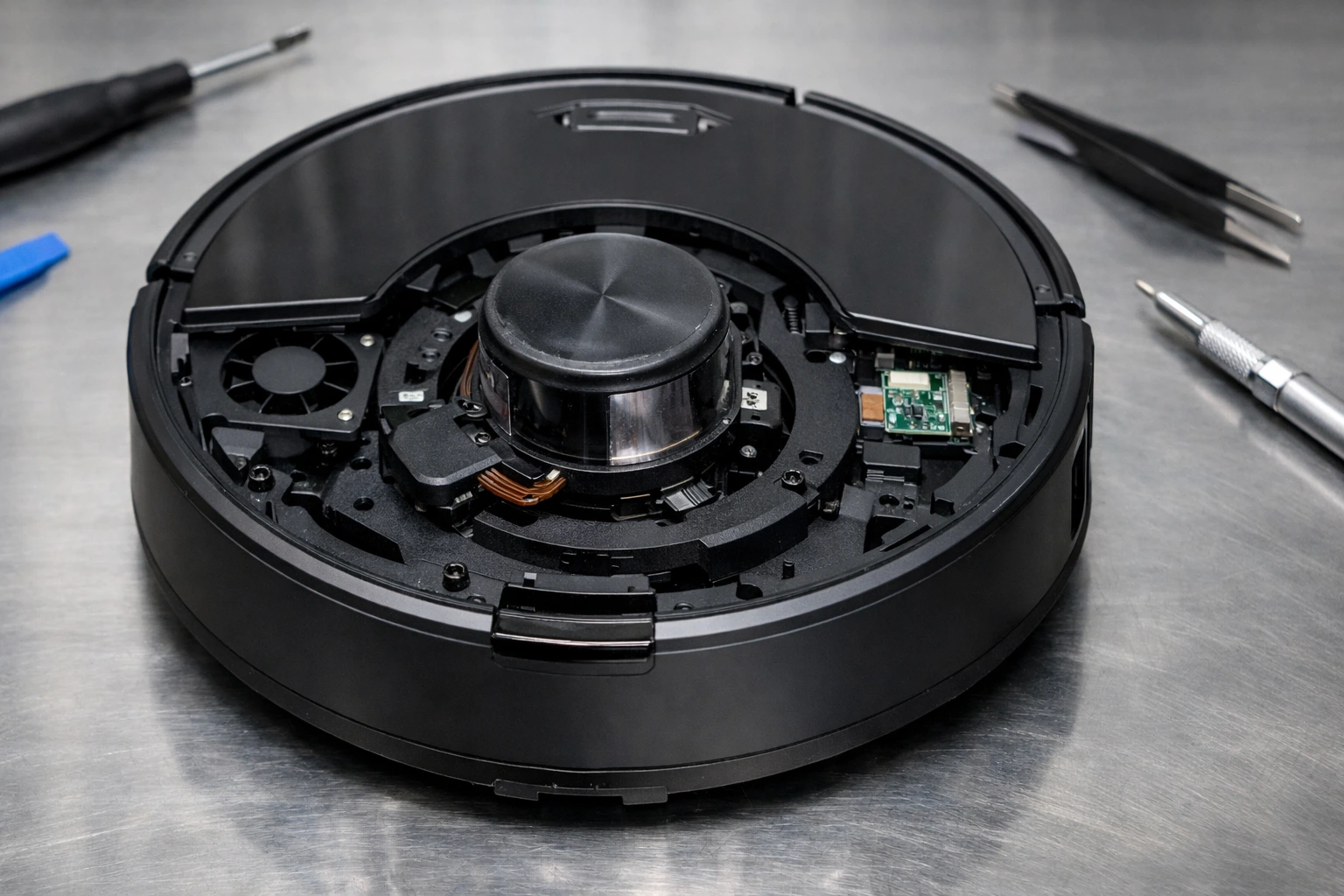
The LDS sensor sits inside the raised “turret” on top of your Roborock. It uses a spinning laser to measure distances, and Error 1 triggers when that rotation is interrupted.
Debris buildup is the most common cause. Hair, dust bunnies, or small grit can wedge between the spinning housing and the fixed base, creating enough friction to stall the motor.
Internal hardware failure is another possibility. Over time, the small rubber belt that drives the turret can slip or snap, or the small DC motor responsible for the spin can burn out.
Tools and supplies you’ll need
- Phillips head screwdriver (size PH1 or PH2)
- Cotton swabs (Q-tips)
- Compressed air canister
- Tweezers
- Small flashlight
Step-by-step instructions
Warning: Always power off the robot vacuum and remove it from the charging dock before attempting any physical troubleshooting to prevent accidental activation.
1. Inspect the laser turret. Use a flashlight to look into the gaps of the raised circular housing on top of the unit.
2. Clear external obstructions. Use tweezers to remove any visible hair or carpet fibers caught around the base of the spinning unit.
3. Use compressed air. Blow short bursts of air into the turret openings to dislodge dust from the optical lenses and the rotation track.
4. Manually rotate the sensor. Gently flick the laser unit with your finger. It should spin freely. If it feels “gritty” or stuck, continue rotating it manually until it moves smoothly.
5. Clean the lenses. Gently insert a dry cotton swab through the turret windows. Wipe the two glass lenses inside to ensure the laser signal is not blocked by a film of dust.
6. Perform a hard reset. If the turret spins freely but the error persists, press and hold the power button to restart the system and clear the software flag.
Warning: Do not use liquid cleaners or water inside the LDS unit. Moisture can permanently damage the sensitive optical sensors and circuitry.
Common mistakes to avoid
- Using excessive force when manually spinning the turret, which can gear-strip the motor.
- Applying lubricants like WD-40 to the turret; these attract more dust and will cause a total failure later.
- Ignoring the internal belt check if the turret moves freely by hand but won’t spin during startup.
How to test if the fix worked
Place the Roborock on a flat surface away from the dock. Press the “Clean” button and observe the turret through the side vents. If the error is resolved, the laser unit will begin spinning immediately, and the robot will start its perimeter scan.
When replacement is the better option
If you have cleared all debris and the turret still refuses to spin, the LDS motor or the laser diode itself has likely failed. These components have a finite lifespan, usually 3 to 5 years depending on usage frequency.
Replacing the entire LDS module is often more cost-effective than professional repair if the unit is out of warranty. If your Roborock is over 5 years old and experiencing multiple sensor errors, a new model may be more economical than individual part replacements.
Frequently asked questions
Why does Error 1 keep coming back?
This usually means there is a deep obstruction or a failing motor. If cleaning doesn’t work, the motor is likely struggling to maintain the required RPM.
Can I use a vacuum to clean the LDS?
Yes, you can use a handheld vacuum to suck debris out of the turret, but compressed air is usually more effective at reaching tight spaces.
What if the laser spins but I still get Error 1?
This suggests the lenses are dirty or the laser diode is burnt out. The robot detects rotation but isn’t receiving the reflected signal back.
Does Error 1 mean I need a new battery?
No, Error 1 is strictly related to the navigation hardware and is not caused by battery or charging issues.
Is it safe to open the LDS housing?
Opening the turret housing is safe for DIYers but will void your warranty. Only proceed if you are comfortable handling small screws and ribbon cables.
Models covered
This guide applies to all Roborock models equipped with LiDAR navigation, including the S5, S6, S7, and S8 series. It also covers the Q5, Q7, and Q-Revo lineups. While the turret design varies slightly between the S5 and the S8 Pro Ultra, the mechanical principles of the LDS remain identical.