Roomba Brushes Not Spinning? 5 Easy Fixes to Restore Suction
When your Roomba runs but leaves debris behind, it often means the main brushes or the side spinning brush aren’t turning. This is one of the most common mechanical issues robot vacuums face.
The good news is that this is rarely a terminal failure. In most cases, the issue is caused by accumulated hair and debris rather than a broken motor.
Before you order expensive replacement parts, follow these steps to clear the obstructions and get the brushes spinning again.
TL;DR: The quick fixes
- Remove the main extractors and cut away wrapped hair.
- Pop off the yellow end caps on the main brushes and clean the metal axles underneath.
- Unscrew and clean beneath the spinning side brush.
- If there is a loud clicking sound, the brush module gears may be stripped.
What causes Roomba brushes not to spin
A Roomba uses a lot of torque to spin its brushes against carpet fibers. When something impedes that spinning, the robot cuts power to the motor to prevent overheating.
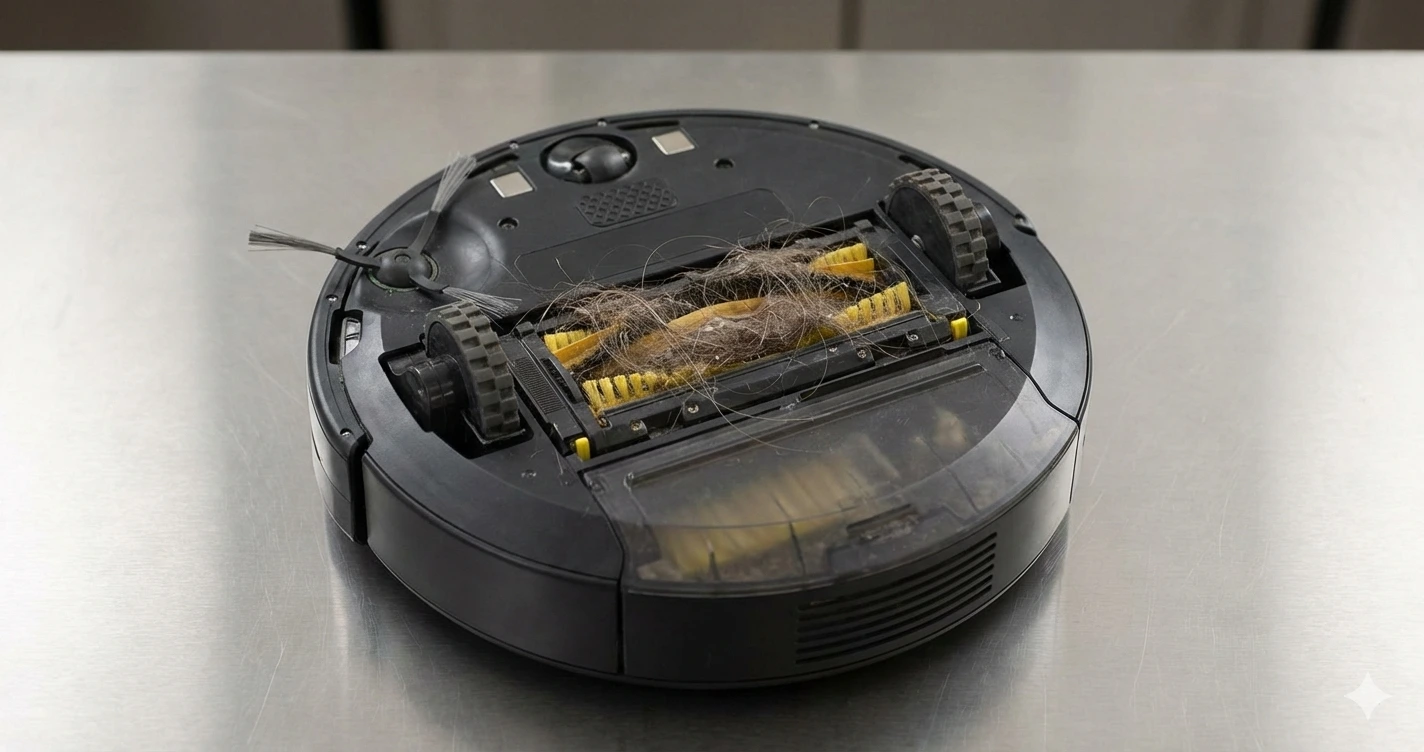
The most common cause is hair tangled in the brush motor area or around the axles. Long hair wraps tightly and eventually binds the bearing completely.
Another common cause is debris buildup under the extractors. If dirt packs into the square drive hub on the cleaning head module, the brush can’t seat properly and won’t turn.
Less frequently, the issue is mechanical. Over time, the plastic gears inside the brush cleaning head module wear down. This often results in a loud Roomba brush clicking noise as the gears slip.
Tools and supplies you’ll need
- Phillips-head screwdriver (usually #1 or #2)
- A cleaning tool with a blade (scissors or a seam ripper also work well)
- A dry cloth
- Needle-nose pliers (optional, for stubborn hair tangles)
Step-by-step instructions
Follow these steps in order. We will start with the easiest general maintenance and move to deeper troubleshooting.
Step 1: Safety prep
Flip your Roomba upside down on a flat, stable surface. If you have a newer ‘s’ or ‘i’ series model, remove the debris bin first to prevent spills.
Warning: Always ensure the robot is powered down before working near moving parts.
Step 2: Clean the main extractors (rollers)
Locate the green cleaning head module containing the two main extractors. Press the yellow release tab(s) to open the extractor frame door.
Lift the two extractors out. If they are stuck, debris may be wedged at the ends; wiggle them gently to free them.
Use your cutting tool to slice through any hair wrapped around the body of the rollers. Peel the hair away and discard it.
Step 3: Deep clean the extractor bearings (Crucial Step)
This is the step most often missed. Hair tangled here is the primary cause of friction that stops the brushes.
On the end of each extractor, you will see a yellow plastic bearing cap. Firmly pull this cap straight off. It might take some force if it hasn’t been removed recently.
Underneath the yellow cap is a metal axle and sometimes a bronze bushing. Remove the massive wad of hair that is inevitably wrapped around this axle.
Wipe the axle and the inside of the yellow cap clean. Snap the cap back onto the extractor until it clicks.
Step 4: Clean the drive hubs and debris path
Look inside the empty robot where the brushes usually sit. On one side, you will see square plastic drive hubs that spin the brushes.
Inspect these hubs for packed dirt. If they are clogged, the brush won’t engage. Scrape any compacted debris out carefully with your screwdriver tip.
Wipe down the entire debris path leading to the dust bin opening to ensure airflow isn’t restricted.
Reinsert the brushes. Match the shapes on the ends of the brushes (usually squares or hexagons) to the corresponding sockets in the robot frame. Close the cage door securely.
Step 5: Clean the side spinning brush
If your side brush isn’t spinning, it is usually jammed with hair wound tightly around its base post.
Use your screwdriver to remove the single screw in the center of the side brush. Pull the plastic brush straight up off the post.
Warning: If a Roomba side brush screw is stuck, do not force it or you will strip the plastic post beneath it. Apply downward pressure while turning slowly. If needed, a tiny drop of penetrating oil left for an hour may help.
Remove the tangle of hair from around the metal post. Reattach the brush and tighten the screw snugly, but do not overtighten.
Common mistakes to avoid
- Skipping the bearings: Cleaning only the outside of the brushes won’t fix a seized bearing under the end caps.
- Using water: Never use water or liquid cleaners on the robot chassis or inside the brush module cavity.
- Ignoring damaged rubber: If the green rubber extractors are torn, flapping pieces can jam the rotation. Trim loose rubber or replace the extractor.
How to test if the fix worked
Flip the Roomba back over. Place it in the center of a room and press the “Clean” button.
Watch the robot for the first minute. You should see the side brush spinning steadily. Place your hand near the exhaust to verify strong airflow, which indicates the main rollers are turning and creating suction.
Listen closely. The robot should hum. If you hear a loud, rhythmic clicking or grinding noise, turn it off immediately. This indicates the gears inside the brush module are stripped and slipping.
When replacement is the better option
If you have performed a deep clean on the bearings and the brushes still won’t spin, the motor inside the cleaning head module may have failed.
If you hear the loud clicking noise mentioned above, the internal gears are stripped. While some advanced DIYers replace just the gears, it is generally more practical to replace the entire cleaning head module assembly.
Replace the rubber extractors if the treads are completely worn smooth or if large chunks of rubber are missing.
Frequently asked questions
Why is my Roomba making a loud clicking noise while cleaning?
A loud, repetitive click usually means the plastic gears inside the main brush module are stripped. The motor is spinning, but the teeth of the gears are skipping instead of turning the brushes. This requires replacing the brush module.
How often should I clean the brushes to prevent this?
In homes with pets or long hair, you should clean the brushes and, crucially, pop off the yellow end caps once a week. In homes with less hair, every two to three weeks is usually sufficient.
Are the two green rubber extractors interchangeable?
No. On most models (like the 800, 900, i, and s series), the two extractors are different. They have different tread patterns and the keyed ends fit into specific sockets. They are usually color-coded or marked light/dark grey on the ends to help match them.
My Roomba says “Error 2: Clear brush cages.” What does this mean?
Error 2 specifically means the robot cannot turn the main brushes. It implies a significant jam. Follow the deep cleaning steps above, paying special attention to the axles under the yellow caps.
Will performing a factory reset fix the brushes?
No. A factory reset fixes software glitches and Wi-Fi issues. It will not fix mechanical resistance caused by hair tangles or stripped gears.
Models covered
The steps in this guide apply generally to nearly all modern Roomba models.
- 500, 600, and 700 Series: These use bristle brushes. The cleaning concept is the same, but cleaning hair out of bristles takes more effort than rubber extractors.
- 800, 900, e, i, and j Series: These use dual green rubber extractors. The instructions above focus on this common design.
- s Series: The cleaning head is wider and positioned differently, but the bearing removal and cleaning process is identical.